Routing Qubit Readout Messages
Goals and Requirements
The goal of this tutorial is to demonstrate the use of the message router to route qubit readout messages from a SHFQA/QC to a HDAWG/SHFSG (or the FPGA option in QHub) for processing feedback. This tutorial assumes that you are already familiar with the SHFQA/QC and HDAWG/SHFSG.
The equipment list is given below.
- 1 QHub
- 1 SHFQA or SHFQC (for qubit readout)
- 1 HDAWG or SHFSG (for feedback processing)
- 1 Ethernet switch
- 1 Ethernet cable per instrument (supplied with your QHub and SHFQA/QC)
- 2 ZSync cables (supplied with your instruments)
Preparation
Connect all instruments by Ethernet to your local area network (LAN) where the host computer resides. Connect the QHub to the SHFQA/QC via ZSync. Connect the HDAWG/SHFSG to the QHub via ZSync and make a note of the used ZSync port on the QHub.
LabOne and the corresponding version of the zhinst-toolkit Python package need to be installed on the host computer.
Note
Important: Please ensure that the instruments are updated to the LabOne version used.
Message Routing
The message router is configurable and routes messages between the following sources and destinations:
Sources:
- ZSync inputs ({SHFSG/QA/QC, HDAWG} --> QHub): Qubit readout data
- Message tester output, a debug/test unit
- FPGA Option output
Destinations:
- ZSync outputs (QHub --> {SHFSG/QA/QC, HDAWG}): Branch/Feedback data
- Message tester input, a debug/test unit
- FPGA Option input
An overview of all possible connections is shown in the diagram below.
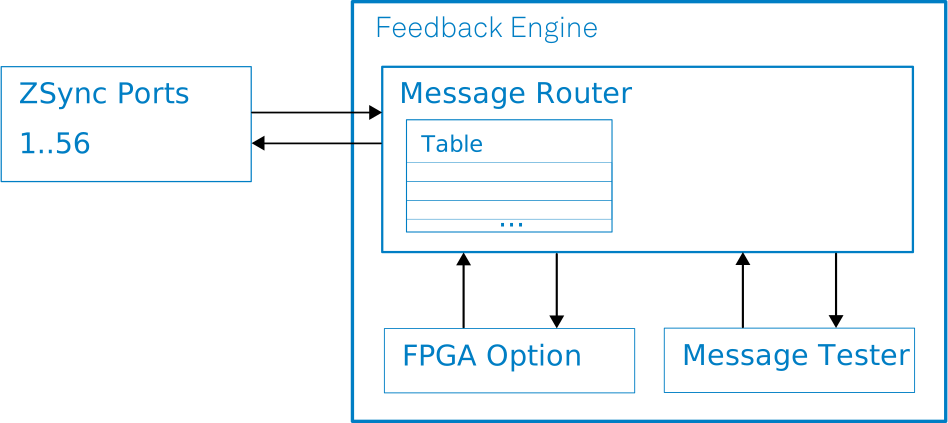
The message router uses a routing table indexed by message ID. Routing is applied to every incoming message. Each entry in the table specifies the output ports to which a message is forwarded. Enabling multiple destination ports replicates a message. If no destination port is enabled for an ID, the router drops messages with that ID.
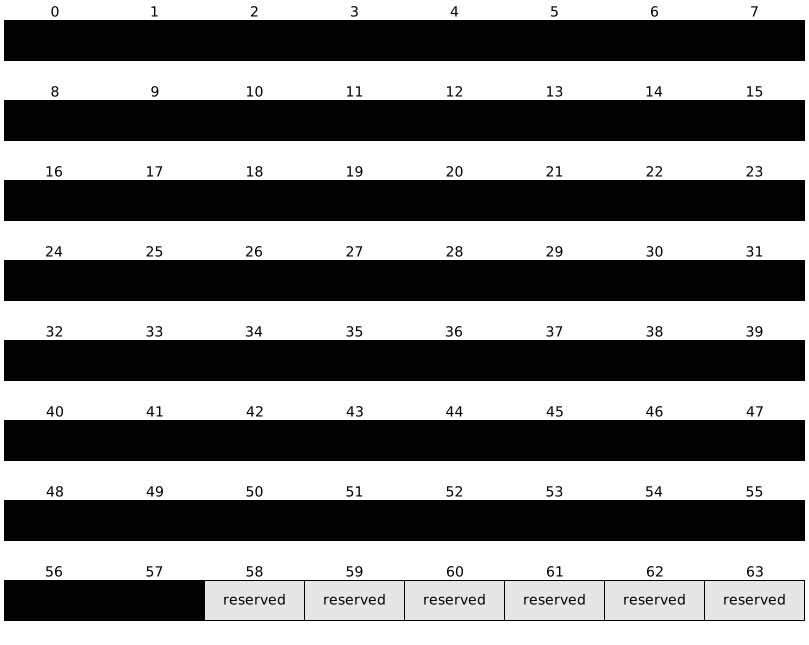
The diagram below shows the router port index assignments as currently implemented:
For simple message-tester checks, you can use arbitrary IDs. In realistic use cases, the ID corresponds to result_address in the startQA SeqC command:
void startQA(const waveform_generator_mask,
             const weighted_integrator_mask,
             const monitor,
             const result_address,
             const trigger)
Ensure that the message-router configuration, QA sequencer programs, and FPGA Option use the same ID mapping.
Example: The following pseudo code shows a configuration that forwards any message with ID 0x12 to the second ZSync port and into the FPGA Option reconfigurable region:
id = 0x12
zsync_port_index = 1
fpga_option_port_index = 57

routing_word = (1 << fpga_option_port_index) | (1 << zsync_port_index)
RoutingTable[id] = routing_word
Note
The MessageRouter helper class shown below can be used to simplify the configuration of the routing table.
Example: Routing readout messages for feedback processing
The Python code below demonstrates the use of the message router to direct readout messages from a SHFQA/QC to custom code in the FPGA (FPGA Option) or a HDAWG/SHFSG for processing feedback.
Setup
Update the values in the following code cell for your setup:
- Set
dev_qhub_strto your QHub device ID. - Set
data_server_ipto your LabOne data server IP address. - Set
zsync_port_sgto the QHub ZSync port index connected to the HDAWG/SHFSG.
Use zero-based indexing for zsync_port_sg (subtract 1 from the back-panel port number).
You can also find the ZSync port index in the QHub web interface under "Ports".
dev_qhub_str = "MUST_BE_REPLACED"   # Replace with your QHub device ID, e.g. "dev24009"
data_server_ip = "MUST_BE_REPLACED" # "localhost" can be used if the data server runs locally
zsync_port_sg = "MUST_BE_REPLACED"  # The ZSync port number (0..55) on the QHub to which the HDAWG/SHFSG is connected
To simplify the use of the message router, the following helper class can be used to set the routing table entries by ID and destination port:
import numpy as np
from typing import Set

ID_WIDTH = 8

class MessageRouter:
    PORT_COUNT = 56 + 2 # 56 ZSync ports + 1 message tester port + 1 FPGA Option port
    TABLE_SIZE = 2 ** ID_WIDTH

    def __init__(self, dev):
        self.dev = dev
        self.ids: set[int] = set()
        self.table = np.zeros(self.TABLE_SIZE, dtype="uint64")

    def add_route(self, id: int, dest_ports: Set[int]) -> None:
        # Ensure that ID is in valid range
        if id >= 2 ** ID_WIDTH:
            raise ValueError(f"ID {id} exceeds max range.")
        # ... and unused
        if id in self.ids:
            raise ValueError(f"ID {id} already used.")
        # Ensure that destination ports are in valid range
        for port in dest_ports:
            if not 0 <= port < self.PORT_COUNT:
                raise ValueError(
                    f"Port {port} is out of valid range [0, {self.PORT_COUNT})."
                )

        # Keep track of the used ids, to ensure that ids are unique
        self.ids.add(id)
        route = 0
        # For each destination port the corresponding bit needs to be set
        for port in dest_ports:
            route |= 1 << port

        # The routing table is ID addressed
        self.table[id] = route

    def configure(self):
        self.dev.raw.msgrouter.table(self.table)
Next, we connect to the QHub instrument.
from zhinst.toolkit import Session

# Setup session, connect to instrument
session = Session(data_server_ip)
dev_qhub = session.connect_device(dev_qhub_str)
Finally, configure the message router to route messages with ID 0x12 to the ZSync port specified by zsync_port_sg, where the HDAWG/SHFSG is connected.
def configure(dev_qhub):
    # Message id identifies the readout result to be routed, it corresponds
    # to the result_address argument in the startQA-sequencer-C command
    id=0x12
    # Destination ports for all messages with the above ID
    dest_ports={zsync_port_sg}

    router = MessageRouter(dev_qhub)
    router.add_route(id=id, dest_ports=dest_ports)
    router.configure()

configure(dev_qhub)
Whenever a SHFQA/QC sequencer program issues a startQA command with result_address = 0x12, the resulting readout message is routed to the HDAWG/SHFSG for feedback processing. For a dedicated example, see "Qubit Readout Tutorial" in the SHFQA user manual. You can also route messages to the FPGA Option.
To test routing on the HDAWG/SHFSG, use waitZSyncTrigger(); in the sequencer program to wait for messages with the configured ID. For more details and additional examples, see the AWG chapter in the HDAWG/SHFSG user manual.
An example of using waitZSyncTrigger(); and reading the message data in the HDAWG/SHFSG sequencer program is shown below. The raw message data is stored in a feedback register, which can be used for further processing or decision making in the sequencer program.
waitZSyncTrigger();
feedback_data = getFeedback(ZSYNC_DATA_RAW, feedback_time);
setUserReg(0, feedback_data);