Functional Overview
This chapter provides an overview of the VHFLI Lock-in Amplifier features. It covers the hardware and software features, the front and back panels, and the ordering guide.
Features
Lock-in Operating Modes
- Internal reference mode
- External reference mode
- Dual channel operation: two independent lock-in amplifiers in the same box
- Arbitrary frequency mode (with VHF-MD option): simultaneous measurement at up to 8 arbitrary frequencies and/or harmonics
Signal Inputs
- 2 low-noise voltage inputs with variable ranges from ±5 mV to ±2 V peak (10 MΩ input impedance)
- Frequency range: DC – 50 MHz (200 MHz with VHF-F200M option)
- Selectable AC/DC coupling for Voltage Inputs
- 2 low-noise current inputs with variable ranges from ±10 nA to ±10 mA
Signal Outputs
- 2 low-noise voltage outputs, DC - 50 MHz (200 MHz with the VHF-F200M option)
- Variable output range, from ±5 mV to ±5 V peak (into high-impedance load)
Demodulators & Reference
- Up to 8 dual-phase demodulators and 8 programmable numerical oscillators (with the VHF-MD option)
- Up to 2 external reference signals
- Individually programmable demodulator filters
- 128-bit internal processing
- 64-bit resolution demodulator sample
- 48-bit internal reference resolution
Auxiliary Input and Outputs
- 4 auxiliary outputs for user-defined signals, > 13 MHz bandwidth, 14 bit, with variable gain ranges, from ±100 mV to ±10 V
- 2 auxiliary inputs, ≥150 MHz bandwidth (-6 dB), with variable gain ranges from ±100 mV to ±10 V
High-speed Connectivity
- BNC connectors on front and SMA connectors on back panel
- USB-C high-speed host interface
- LAN/Ethernet 1 Gbit/s controller interface
- Up to 2 input and up to 2 output trigger signals
- DIO: 32-bit digital input-output port
- Clock input/output connectors (10/100 MHz)
Analysis and Automation Tools
- Numeric tool
- Plotter
- Oscilloscope
- Sweeper and Frequency response analyzer
- FFT spectrum analyzer
- Data Acquisition tool
- Timeline Module
Software Features
- LabOne® user interface with simultaneous multi-instrument control
- LabOne® user interface with simultaneous multi-instrument control
- Data server with multi-client support
- API for Python, MATLAB®, LabVIEW™, .NET, and C.
Front Panel Tour
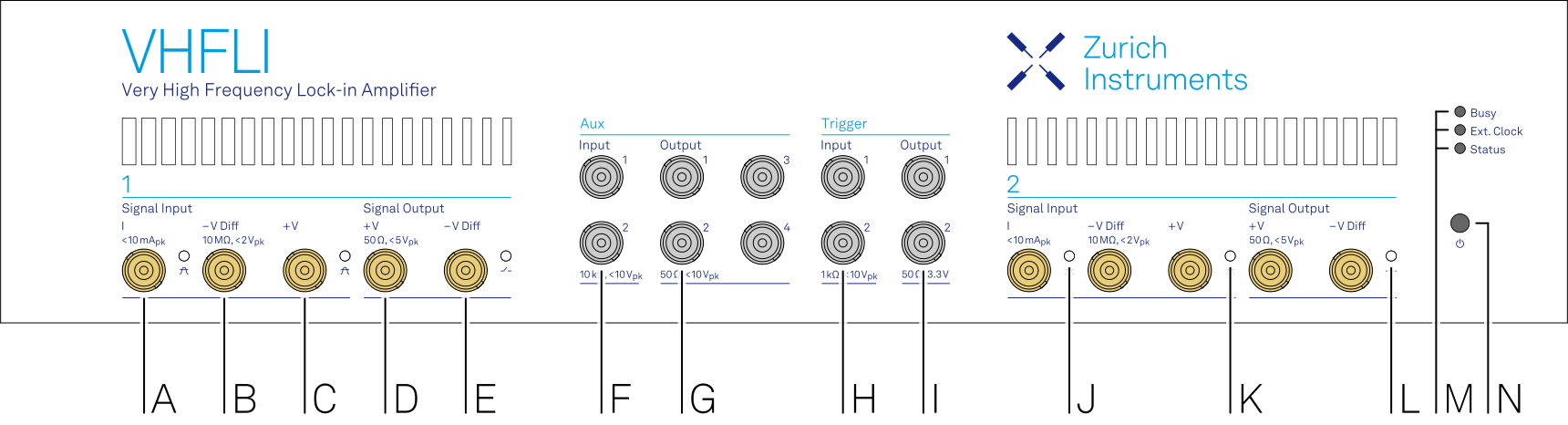
The front panel BNC connectors and control LEDs are arranged as shown in Figure 1 and described in Table 1.
| Position | Label / Name | Description |
|---|---|---|
| A | Signal Input I | single-ended current input |
| B | Signal Input –V Diff | voltage input |
| single-ended mode: floating | ||
| differential mode: negative voltage input | ||
| C | Signal Input +V | voltage input |
| single-ended mode: single-ended voltage input | ||
| differential mode: positive voltage input | ||
| D | Signal Output +V | voltage output |
| single-ended mode: single-ended voltage output | ||
| differential mode: positive voltage output | ||
| E | Signal Output –V Diff | voltage output |
| single-ended mode: internally shorted to ground | ||
| differential mode: negative voltage output | ||
| F | Aux Inputs | auxiliary inputs 1 and 2 |
| G | Aux Outputs | auxiliary outputs 1 to 4 |
| H | Trig Inputs | trigger inputs 1 and 2 |
| I | Trig Outputs | trigger outputs 1 and 2 |
| J | Signal Input I Over | Red LED: current input signal is saturating the A/D converter. Increase the current input range or attenuate the signal. |
| K | Signal Input V Over | Red LED: voltage input signal is saturating the A/D converter. Increase the voltage input range or attenuate the signal. |
| L | Signal Output ON | Blue LED: signal output is actively driven. |
| M | multicolor LEDs |
|
| Busy | unused | |
| Ext. Clock |
|
|
| ZSync | unused | |
| Status |
|
|
| N |  Soft power button |
Power button with incorporated status LED
|
Back Panel Tour
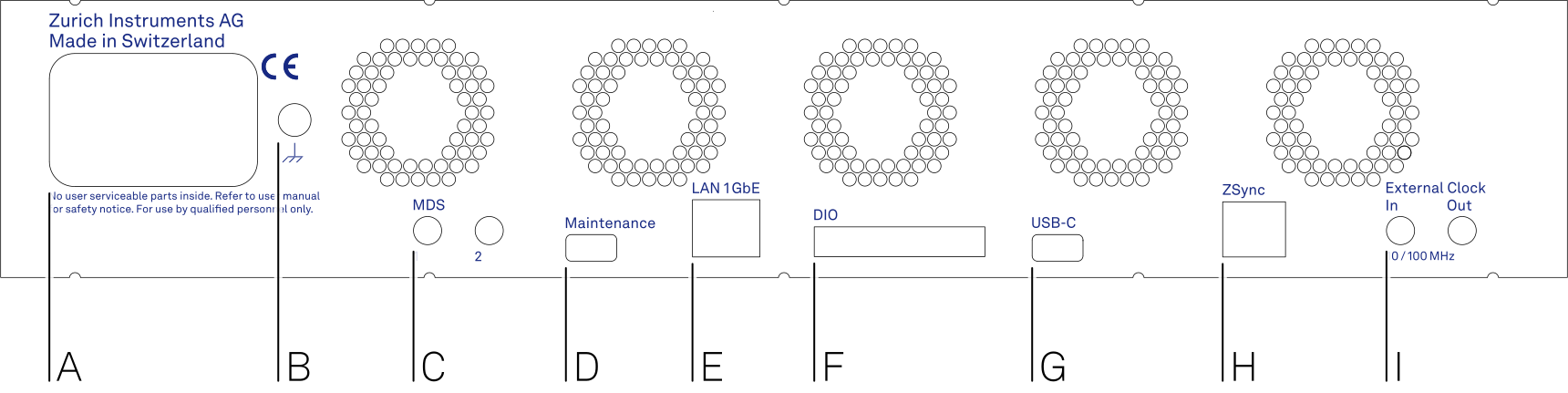
The back panel is the main interface for power, control, service, and connectivity to other ZI instruments. Refer to Figure 2 and Table 2 for the detailed description of the items.
| Position | Label / Name | Description |
|---|---|---|
| A | AC 100 - 240 V | Power inlet, fuse holder, and power switch |
| B | 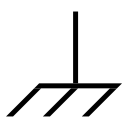 Earth ground |
4 mm banana jack connector for earth ground, electrically connected to the chassis and the earth pin of the power inlet |
| C | MDS 1 & 2 | SMA: bidirectional TTL ports for multi-device synchronization |
| D | Maintenance USB-C | USB-C port Attention: This port offers limited data throughput; the USB-C port (see position G) is recommended for normal operation |
| E | LAN 1GbE | 1 Gbit LAN connector for instrument control and data acquisition |
| F | DIO 32bit | 32-bit digital input/output (DIO) connector |
| G | USB-C | USB-C 3.0 port for instrument control and data acquisition |
| H | ZSync Primary | unused Attention: This is not an Ethernet plug, connection to an Ethernet network might damage the instrument |
| I | External Clk In and Out | External clock (10 MHz/100 MHz) Input and Output for synchronization with other instruments |
Ordering Guide
Table 3 provides an overview of the available VHFLI products. Upgradeable features are options that can be purchased anytime without the need to send the instrument back to Zurich Instruments.
| Product code | Product name | Description | Field upgrade possible |
|---|---|---|---|
| VHFLI | VHFLI Lock-in Amplifier | base lock-in amplifier | - |
| VHF-F200M | VHF-F200M 200 MHz Frequency extension | option | yes |
| VHF-MD | VHF-MD Multi-demodulator | option | yes |
| VHF-MOD | VHF-MOD AM/FM Modulation | option | yes1 |
| VHF-PID | VHF-PID Quad PID/PLL Controller | option | yes |
| VHF-AWG | VHF-AWG Arbitrary Waveform Generator | option | yes |
| VHF-BOX | VHF-BOX Boxcar Averager Option | option | yes |
| VHFLI-OB50 | VHFLI 50 MHz Option Bundle | bundle | no |
| VHFLI-FOB | VHFLI Full-Option Bundle | bundle | no |
1 Requires VHF-MD Multi-demodulator option